Keima is pleased to announce a partnership with the industry leading ray-tracing vendor, Wavecall. See the announcement on our webpage: Keima Wavecall Partnership.
Early mobile WiMAX (IEEE 802.16e) deployments will concentrate on major cities (see Sprint's announcement). Accurate modelling is essential for mobile WiMAX operators if they want to achieve an effective rollout and urban models should be used. Keima will implement Wavecall's industry leading WaveSight propagation model within our Overture network optimisation platform. We will also collaborate on consultancy services and training.
Thursday, November 16, 2006

Wednesday, September 13, 2006
.NET Remoting config schema
I've recently been working with .NET Remoting; writing a small distrubuted framework for sending "work packets" across a set of machines. I'm trying to be a good developer by ensuring all compile and schema warnings are fixed. However, no matter what I did, my App.config file was issues warning after warning for misconfigured elements I knew to be correct. Moreover, Visual Studio IntelliSense did not work with remoting application entries within <system.runtime.remoting/>.
This annoyed me somewhat, so I decided to investigate.
I first checked the properties for App.config to see what schema was used. Config files follow the DotNetConfig.xsd schema which, for me, sits in the default installation folder (C:\Program Files\Microsoft Visual Studio 8\Xml\Schemas). I searched for the remoting definition and found the elements and attributes of system.runtime.remoting were missing. A quick Google revealed this was happening to a lot of people. Basically, the schema shipped with Visual Studio is incomplete.
In order to fix this, and being lazy and not knowing too much about XML Schemas, I constructed a sample .xml file using all the elements defined in the Microsoft schema reference (http://msdn2.microsoft.com/en-us/library/z415cf9a.aspx). Then, using the XML->Create Schema feature of Visual Studio, I generated the relevant schema definitions. I then added attribute information for each element defined in the schema reference to this output. This produced a complete (to the best of my knowledge) definition of system.runtime.remoting. I then replaced the element definition within DotNetConfig.xsd (being careful to copy the vs:help info into the element definition). NOTE: make a backup copy of your existing DontNetConfig.xsd first.
Anyway, after all this hoop jumping, I now have a working system.runtime.remoting schema that removes all the warnings. Intellisense also works.
Here is a copy of the fixed DotNetConfig.xsd. Hopefully others will find this useful.
This annoyed me somewhat, so I decided to investigate.
I first checked the properties for App.config to see what schema was used. Config files follow the DotNetConfig.xsd schema which, for me, sits in the default installation folder (C:\Program Files\Microsoft Visual Studio 8\Xml\Schemas). I searched for the remoting definition and found the elements and attributes of system.runtime.remoting were missing. A quick Google revealed this was happening to a lot of people. Basically, the schema shipped with Visual Studio is incomplete.
In order to fix this, and being lazy and not knowing too much about XML Schemas, I constructed a sample .xml file using all the elements defined in the Microsoft schema reference (http://msdn2.microsoft.com/en-us/library/z415cf9a.aspx). Then, using the XML->Create Schema feature of Visual Studio, I generated the relevant schema definitions. I then added attribute information for each element defined in the schema reference to this output. This produced a complete (to the best of my knowledge) definition of system.runtime.remoting. I then replaced the element definition within DotNetConfig.xsd (being careful to copy the vs:help info into the element definition). NOTE: make a backup copy of your existing DontNetConfig.xsd first.
Anyway, after all this hoop jumping, I now have a working system.runtime.remoting schema that removes all the warnings. Intellisense also works.
Here is a copy of the fixed DotNetConfig.xsd. Hopefully others will find this useful.
Monday, August 14, 2006
Microsoft Windows Live Writer
See Windows Live Writer for a really cool Microsoft app. Windows Live Writer allows users to write and post their blogs. It works really well with Windows Live Spaces. It can publish to Blogger, but I had lots of problems with Blogger giving various exceptions.
Friday, August 11, 2006
Wednesday, July 12, 2006
Virtual PC Is Now Free
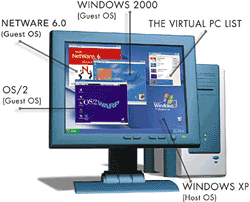
One of the most important tools for debugging and support is Microsoft Virtual PC, so it's great to see it's now freeware.
Friday, June 16, 2006
Google change licensing
Google Earth Free or Plus cannot be installed at work. See Google Earth at the office? You need Pro.
Check out the terms:
"USE OF SOFTWARE The Software is made available to you for your personal, non-commercial use only. You may not use the Software or the geographical information made available for display using the Software, or any prints or screen outputs generated with the Software in any commercial or business environment or for any commercial or business purposes for yourself or any third parties."
This is very restrictive and you are not even allowed to use the screengrabs. This is so restrictive I suspect they'll have to adjust this in the near future.
The bottom line, if you plan to use Google Earth in a commercial environment or build solutions around it, is that you must use the Pro version at $400.
The cost of this product in a commercial environment is understandable - Google have to make a living after all - and the cost seems reasonble to me. The concern for me is the fact that the terms changed to become more restrictive.
This is not unique to Google since other companies have does this in the past. The concern comes from the fact that Google have a different business model. In the past you would buy a product such as Microsoft Excel and install it on your own computer. You'd own the data and the application. What happens with the new business model that Google intends us to use whereby Google stores the data and provides the application (e.g. Google Spreadsheets). What happens if they changed the terms for these sorts of applications?
Check out the terms:
"USE OF SOFTWARE The Software is made available to you for your personal, non-commercial use only. You may not use the Software or the geographical information made available for display using the Software, or any prints or screen outputs generated with the Software in any commercial or business environment or for any commercial or business purposes for yourself or any third parties."
This is very restrictive and you are not even allowed to use the screengrabs. This is so restrictive I suspect they'll have to adjust this in the near future.
The bottom line, if you plan to use Google Earth in a commercial environment or build solutions around it, is that you must use the Pro version at $400.
The cost of this product in a commercial environment is understandable - Google have to make a living after all - and the cost seems reasonble to me. The concern for me is the fact that the terms changed to become more restrictive.
This is not unique to Google since other companies have does this in the past. The concern comes from the fact that Google have a different business model. In the past you would buy a product such as Microsoft Excel and install it on your own computer. You'd own the data and the application. What happens with the new business model that Google intends us to use whereby Google stores the data and provides the application (e.g. Google Spreadsheets). What happens if they changed the terms for these sorts of applications?
Monday, June 12, 2006
Google Earth 4 Beta Released
Download here.
The GUI is simplified and look a lot cleaner. But the coolest thing is the textured buildings.

Now becomes:

There's also a new version of KML.
(Updated: testing Office Word 2007 B2TR's editing abilities for existing posts.)
Saturday, June 10, 2006
.NET Framework 3.0
Microsoft have renamed WinFX to the .NET Framework 3.0.
Apparently, this is to reduce confusion. WinFX is built on 2.0, so now we have .NET Framework 3.0 built on .NET CLR 2.0 and hence .NET Framework 3.0 is built from .NET 2.0 compilers. Now I'm confused. I preferred the separation of the development platform from the underlying OS API. Does this mean there will be no further updates to the .NET Framework for Windows 2000?
Note that LINQ was due in .NET Framework 3.0 (as far as I understand it, LINQ requires changes to the CLR). Jason Zander indicates that LINQ support, which is part of the "Orcas" project, will appear after .NET Framework 3.0. Does this mean we'll have a further update to the .NET Framework soon after Vista ships?
Apparently, this is to reduce confusion. WinFX is built on 2.0, so now we have .NET Framework 3.0 built on .NET CLR 2.0 and hence .NET Framework 3.0 is built from .NET 2.0 compilers. Now I'm confused. I preferred the separation of the development platform from the underlying OS API. Does this mean there will be no further updates to the .NET Framework for Windows 2000?
Note that LINQ was due in .NET Framework 3.0 (as far as I understand it, LINQ requires changes to the CLR). Jason Zander indicates that LINQ support, which is part of the "Orcas" project, will appear after .NET Framework 3.0. Does this mean we'll have a further update to the .NET Framework soon after Vista ships?
Virtual Earth Interactive SDK

Microsoft have released a one-stop shop for the Windows Live Platform which includes the latest APIs, code samples etc. See dev.live.com.
One of the first examples is an interactive version of the Virtual Earth SDK - Virtual Earth Interactive SDK.
Wednesday, June 07, 2006
Monday, May 15, 2006
John Carmack doubtful of PS3 Cell
John Carmack says game development on the Cell platform will be too difficult and thinks that Sony have ultimately made a mistake. However, he thinks that the PS3 will be a success since Sony have a loyal following and current market dominance.
See G4 TV. There are also some cool shots of Enemy Territory: Quake Wars.
See G4 TV. There are also some cool shots of Enemy Territory: Quake Wars.
Thursday, May 11, 2006
World Cup Schedule
The World Cup 2006 fixture list from Microsoft's bCentral will install calendar items into Outlook and a Windows Mobile phone for all matches. It even adds a reminder 2 hours before each match to allow me ample time to get to the pub.
Google Gapminder Beta 2
Google have a beta visualization tool for the Gapminder data. See Google Gapminder.
It is interesting to watch the animations for things such as phone use over the last 20 years.
A more shocking result is seen by plotting life expectancy. Notice how this generally increases but moves backwards for the sub-saharan countries of Africa.
It is interesting to watch the animations for things such as phone use over the last 20 years.
A more shocking result is seen by plotting life expectancy. Notice how this generally increases but moves backwards for the sub-saharan countries of Africa.
Tuesday, May 09, 2006
Visual Studio Team System Unit Testing for C++
Nick Wienholt has a useful article on Visual Studio Team System Unit Testing from a C++ perspective (via Rob Caron).
Wednesday, May 03, 2006
Consolas Font Pack
Consolas Font Pack.
The Microsoft Consolas Font Family is a set of highly legible fonts designed for ClearType. It is intended for use in programming environments and other circumstances where a monospaced font is specified. This installation package will set the default font for Visual Studio to Consolas.
The Microsoft Consolas Font Family is a set of highly legible fonts designed for ClearType. It is intended for use in programming environments and other circumstances where a monospaced font is specified. This installation package will set the default font for Visual Studio to Consolas.
Skype release 2.5 beta

Skype release a new beta: download Skype 2.5 Beta. The main new feature is the ability to send SMS messages to mobile contacts (see change log).
Wednesday, April 26, 2006
SyncBack SE Updated
The best folder syncronization tool, SyncBack, has been updated. See the History of Changes.
Wednesday, April 05, 2006
Apple Boot Camp
Apple Boot Camp will allow Mac users to run Windows. It'll be available in Mac OS X 10.5.
Atlas Virtual Earth Map tutorial

Jonathan Hawkins has a great tutorial on building a Mashup of National Parks using the Atlas Virtual Earth Map control.
Go directly to the result here.

Subscribe to:
Posts (Atom)
